 我的圖書館帳戶
 English


1. How to edit my personal profile in Scholars Hub?
a. Please click “Login” at the top right corner of the Scholars Hub homepage and use SSO (UTM network account) to login.

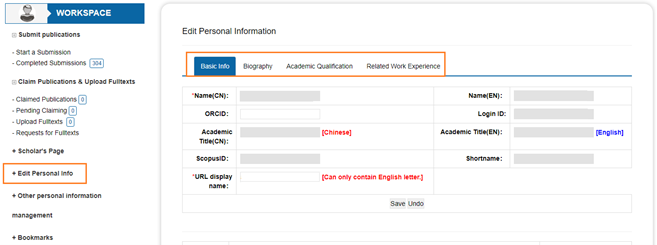
b. It will direct to “My Workspace”, click Edit Personal Info at the left column, you can update your Basic Info, Biography, Professional Qualification/Training and Related Work Experience.
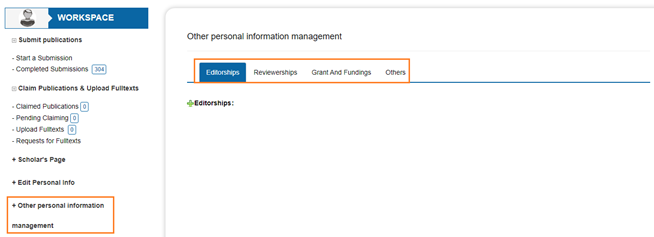
c. You can also update your Editorships, Reviewerships, Grant And Fundings or Others in Other personal information management.
2. Do all publications need to submitted manually?
If your publication is already indexed in Scopus and affiliated with UTM (former IFTM), it will be automatically imported to the Scholars Hub by Library periodically, otherwise, you can submit the publication manually.
Watch the video on how to submit the publications.
https://utm.ap.panopto.com/Panopto/Pages/Viewer.aspx?id=44ccd150-d85f-4726-a4bd-b0f3001f5920
For the publications that are not affiliated with UTM (former IFTM), scholars can also input the publications to showcase the visibility in their scholars page, when submit, please select the target collection: Personal research not belonging to the University (Any document upload under in this collection will be remove after library cross check).
NOTE: Full text paper is required to upload when self-input.
3. When will the publication available on the Scholars page after it has been included in the Scopus?
The Library will update the publications from Scopus database weekly, usually paper will be indexed in Scopus within 4 days once Scopus receives an article. Source
4. How many “Document Type” that I can submit in UTM scholars Hub?
a. Journal articles: Research articles published in academic journals, usually include abstracts and cited references
b. Conference papers: Full papers presented at a seminar or conferences, or published in conference proceedings
c. Thesis: Master/PhD degree dissertation
d. Books: Author of the book (Monographs) / editor of a book (Edited volume)
e. Report: A document that presents information for a specific purpose
f. Presentation: Presentations/PPT slides given at a conference, seminar or similar meeting
g. Newspaper Article: Information released in a newspaper and accessible to the public
h. Book Chapters: Publications written within part of a book
i. Case Study: A detailed study of a specific subject, usually involves qualitative/quantitative methods
j. Magazine: Articles published in leisure journals
k. Abstract: Abstracts that have been presented at a seminar or conference meeting
5. How to Select “Target Collection” when submitting a publication record?
If your publication is affiliated with UTM, please select the Target Collection by your School or department, if not, you can select “personal research not belonging to the institution”.
6. How can I find or update my Scopus ID?
Please check your Scopus ID here by enter your last name and first name, if you want to update the Scopus ID, please contact library@utm.edu.mo
7. How to import Scholars Hub data to DPFA (Faculty Appraisal)?
After self-input the publication in Scholars Hub, Library will do cross checking on the information, it may take 1 or 2 working days, once the publication is released on Scholars Hub platform, you can find the record in DPFA.
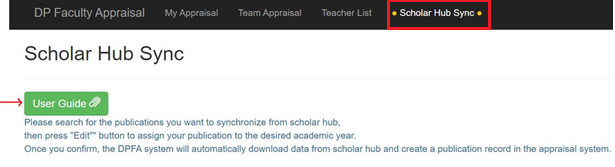
Please note that only Journal, Conference paper, Book (Edited Volume/Monograph) and Book Chapter will be sync to DPFA, after login, please click “ .Scholar Hub Sync.” and claim the publication for your appraisal year, for details, please check the user guide in DPFA or contact IT staff for information.